Setup Xspatula DB
The first step in building up an Xspatula framework is to setup a postgreSQL database. You can also use Xspatula just for setting up a database without using the framework for something else.
Prerequisits
To build your own postgreSQL database using the Xspatula framework you might need to install the following applications/files:
- Visual Studion code (VScode) (if you want to use the Jupyter notebook interface),
- postgreSQL (unless you have access to a machine with postgres installed),
- Anaconda or any other application for defining virtual python environments, and/or
- A .netrc file that defines your credentials for setting up new databases (to protect your login credentials).
Hidden files and security
To create secure login credentials for the postgreSQL superuser that you must have for building the framework database, and for other users accessing the database, two sets of hidden files holding the credentials can be used.
.netrc
A .netrc file is a hidden file in your home directory where you can store login credential to postgreSQL or any other server resource. You do not need to use a .netrc file to setup or run the Xspatula framework, you can also give your login and password in plain text in a scheme file as explained below. If you want to use a .netrc file, create a file named .netrc in the home directory of your own machine and enter the credentials by stating machine, login and password:
machine postgresql login <superuser> password <passphrase>
Where machine is the code word you send to .netrc for the resource you want to access, and login and password are the credentials on the resource you are trying to enter.
.environment
When a user tries to login to the framework database, a postgreSQL session is opened and the user credentials are read from the database. If the user and password are found, the database is instead opened from an environment (.env) file reflecting the rights of the user logging in. When you setup an Xspatula database, the framework automatically creates .env files for different categories of postgres users (pg_user in postgres jargon). The framework includes some default pg_users, but you most probably want to define your own. All the hidden .env files will by default be saved in the framework python package path:
./src/postgres/environment
All environment files contain the following entries:
DB_HOST=localhost
DB_NAME=my_database
DB_USER=db_user
DB_PASSWORD=db_user_password
These credentials are automatically loaded when a user is recognised in the system and then used for accessing the database. The default .env files created by the framework when setting it up include:
- community_admin (for handling users),
- login_evaluation (used for checking all login attempts),
- user_cat_0
- user_cat_1
- user_cat_2
- user_cat_3
- user_cat_4
- user_cat_5
The different user categories (user_cat_0 to user_cat_5) have varying rights using the database, with 0 have the least and 5 the most.
Notebook interface
The framework database can be managed through two of the Jupyter notebooks included in the online repository:
- ./setup/setup_db.ipynb
- ./setup/delete_db.ipynb
To learn more, see the documents on notebooks and VScode.
Scheme file
Running Xspatula requires a scheme file that defines the user credentials for accessing the database and can also define default settings for execute, overwrite and delete. The scheme file also links to the library of JSON command files to run. To actually interact with the framework database, the scheme file points to a job_file (project) that links to the process file(s) to run.
The scheme file and the JSON command files can be located anywhere on your system. The default setting is to store the library of files inside the framework itself - referencing it as a relative path in the scheme file. This allows you to initially run the framework without consideration of paths and operating systems while testing it. Once you understand the system you can put the scheme file and the JSON command structure in any other relative or absolute path.
Scheme file for database setup
The scheme file for setting up your database must define both the postgres superuser that will own the database as well as other postgres users (pg_user) that can access the database.
In the example of a scheme file for setting up a database below I have added some comments indicated by a hashtag (#). These comments are not allowed in a production version of a scheme file.
{
  "project_path": "./xspatula", # Absolute or relative path to the root folder of your project, e.g. for setting up a database
  "postgresdb": { # Defines the postgres database cluster and your superuser credentials allowing you to create a new database
    "host": "localhost", # The host of your database cluster
    "port": 5432, # The port that your database cluster is attached to
    "db": "name_of_db_to_create", # The name of the postgreSQL database to create
    "host_netrc_id": "my_host_db_netrc_access_code", # The login credentials for your overaraching postgres database
    "user_name": "your_superuser_for_postgres", # Only required if host_netrc_id not stated
    "password": "your_superuser_password_for_postgres", # Only required if host_netrc_id not stated
    "db_users": [ # array of pg_users to add as users in the new postgres database and their credentials
      {
        "user_id": "community_admin", # pg_user for community administration
        "password": "guessing-rubble-garden-opera", # password for pg_user community_admin
        "role": "community_admin" # predefined (hardcoded) type of pg_user
      },
      {
        "user_id": "login_evaluation", # pg_user for checking any login attempt to the database (very restricted)
        "password": "hippodrome-bicycle-concert-shuttle", # password for pg_user login_evaluation
        "role": "login_evaluation" # predefined (hardcoded) type of pg_user
      },
      {
        "user_id": "user_cat_0", # most restricted database pg_user
        "password": "tablecloth-summerleaf-riverbasin-vacuumcleaner", # password for pg_user user_cat_0
        "role": "user_cat_1" # predefined (hardcoded) type of pg_user
      },
      ...
      ...
      {
        "user_id": "user_cat_5", # most permissive database pg_user
        "password": "fireplace-olympicgames-grassroot-luminescence", # password for pg_user user_cat_5
        "role": "user_cat_5" # predefined (hardcoded) type of pg_user
      }
    ]
  },
  "process": [ # Default settings for all processes called from this scheme file
    {
      "execute": true,
      "verbose": 1,
      "overwrite": false,
      "delete": false # Must be set to false to setup a database
    }
  ]
}
Default (human) users
The postgres superuser defined in the scheme file for setting up your new database will become both the owner and a superuser for your new database. The default processes defined for setting up a new database include the definition of ordinary user(s) (not pg_users) in the database. The default user (Jane Doe) in the online repository has the user name jane_doe and the password is hello-xspatula. It is recommended that you change the names and passwords of the default users in the file
./setup/zzz/xspatula/setup_db/jsonsql/community_user_records_v10_sql.json.
You must then also change the login credentials in the subsequent scheme files for ordinary login (not database setup). You can also always login with the superuser that you used for setting up the database.
For details on including default users as part of the database setup, see the document on defining schemas and tables.
Scheme file for database delete
The framework package allows deleting either parts of, or the whole database with a single process. To do that the scheme file must still have a project_path, define the postgres database cluster and your superuser credentials allowing you to delete the database. You must also set the process object delete to true:
{
  "project_path": "./xspatula", # Absolute or relative path to the root folder of your project for deleting a database
  "postgresdb": {
    "host": "localhost", # The host of your database
    "port": 5432, # The port that your database is attached to
    "db": "name_of_db_to_delete", # The name of the postgreSQL database to delete
    "user_name": "your_superuser_for_postgres", # Only required if host_netrc_id not stated
    "password": "your_superuser_password_for_posgres", # Only required if host_netrc_id not stated
  },
  "process": [ # Default settings for all processes called from this scheme file
    {
      "execute": true,
      "verbose": 1,
      "overwrite": false,
      "delete": true # Must be set to true to delete a database
    }
  ]
}
Job file (project file)
The scheme file object project_path defines the path to the root directory of your actual project to run. A project is built up using a hierarchy of command files, with a JSON job_file at the top. In the job_file there are three options for linking to the process_files you want to run:
- directly to a single JSON process_file,
- defining an array of JSON process_files, or
- via a simple text pilot_file listing the process_files to run.
The default setting in the Xspatula GitHub online repository is linking to a pilot_file.
{
  "process": {
    "job_folder": "setup_db",
    "process_sub_folder": "jsonsql",
    "pilot_file": "db_xspatula_setup.txt"
    ]
  }
}
See the document on job files for details.
Pilot file
A pilot file is a simple text file, where empty lines and lines starting with a hash-tag (#) are ignored when executing. The advantage with a pilot file is that you can write notes and turn individual process files on and off by using a hash-tag. The example below shows the process files that must be run to setup any Xspatula dataset using the framework default settings.
#################################################
##### DEFINE XSPATULA DB SCHEMAS AND TABELS #####
#################################################

###===========================================###
### SCHEMAS ###
###===========================================###
#!!!!! The schemas must be defined before the tables

schema_v10_sql.json

###===========================================###
### GENERAL UTILITIES AND TERRITORIES###
###===========================================###
#!!!!! Territory codes are required by community

utility_v10_sql.json

utility_territory_v10_sql.json

###===========================================###
### COMMUNITY ###
###===========================================###
#!!!!! user categories required for adding users

community_user_categories_v10_sql.json

community_user_categories_records_v10_sql.json

#!!!!! organisations required for adding users
community_organisation_v10_sql.json

#!!!!! EDIT TO INCLUDE AT LEAST ONE DEFAULT ORGANISATION
community_organisation_records_v10_sql.json

#!!!!! users required for adding processes
community_user_v10_sql.json

#!!!!! EDIT TO INCLUDE AT LEAST ONE USER THAT WILL BE THE CREATOR OF THE PROCESSES
community_user_records_v10_sql.json

###===========================================###
### PROCESSES ###
###===========================================###
#!!!!! processes required for adding processes

processes_v10_sql.json

#!!!!! processes records adds the processes for adding all other processes
processes_records_v10_sql.json

...
To learn more, see the document on pilot file.
Process file
All JSON process_files are built from the same objects and arrays. The example below shows the process for creating schemas, a process that is as simple as it gets in the framework. The example also shows how it is possible to stack any number of processes in a single process_file.
{
  "process": [
    {
      "process_id": "create_schema",
      "parameters": {
        "schema": "observation"
      }
    },
    ...
    ...
    {
      "process_id": "create_schema",
      "parameters": {
        "schema": "community"
      }
    }
  ]
}
To learn more, see the document on process file.
Define the community accessing the database
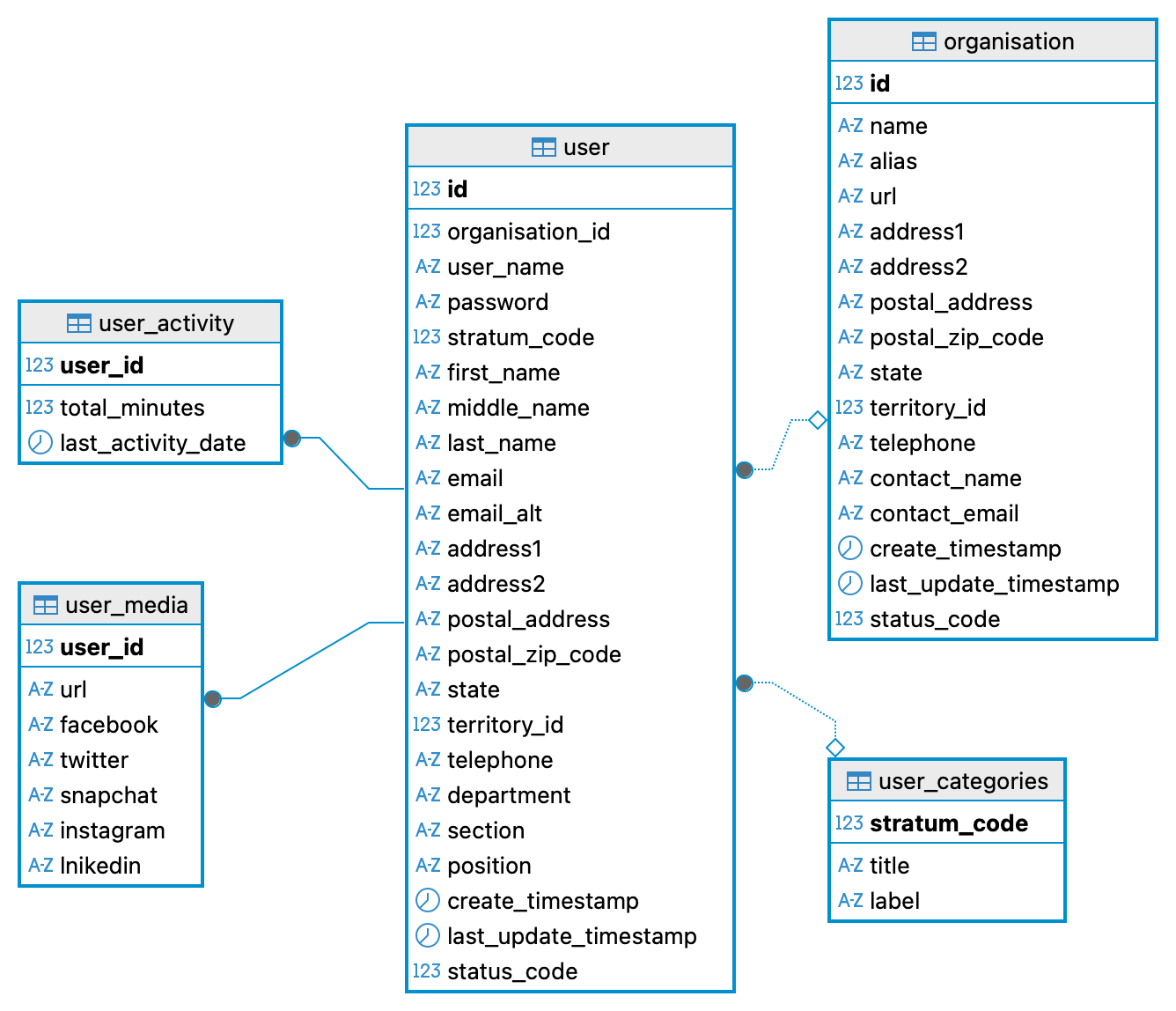
The default setting is to create a schema called community, including the following tables:
- user_categories
- organisation
- user
- user_media
- user_activity
The table user and the columns user_name, password, and stratum_code are searched each time a user is trying to login. The stratum_code defines which .env file a user is entering the database with and thus the privileges that that user has in the database. If you change the name of either the schema, the table or these columns, you need to update the python source code accordingly.
For details on defining tables and columns, see the document on [tables][#]. NOT YET AVAILABLE.
Community organisations and users
The process_files community_organisation_records_v10sql.json and community_user_records_v10_sql.json directly inserts records in the community schema tables organisation and user. The users inserted will get immediate access to the created database. This the user name name you have to state in the _scheme object user_project:user_name. The password can also be given as an object in the scheme_file (user_project:user_password). Alternatively you can put the password in a .netrc.
The figure below illustrates the content and connections for the schema community after setting up the Xspatula framework.
Processes
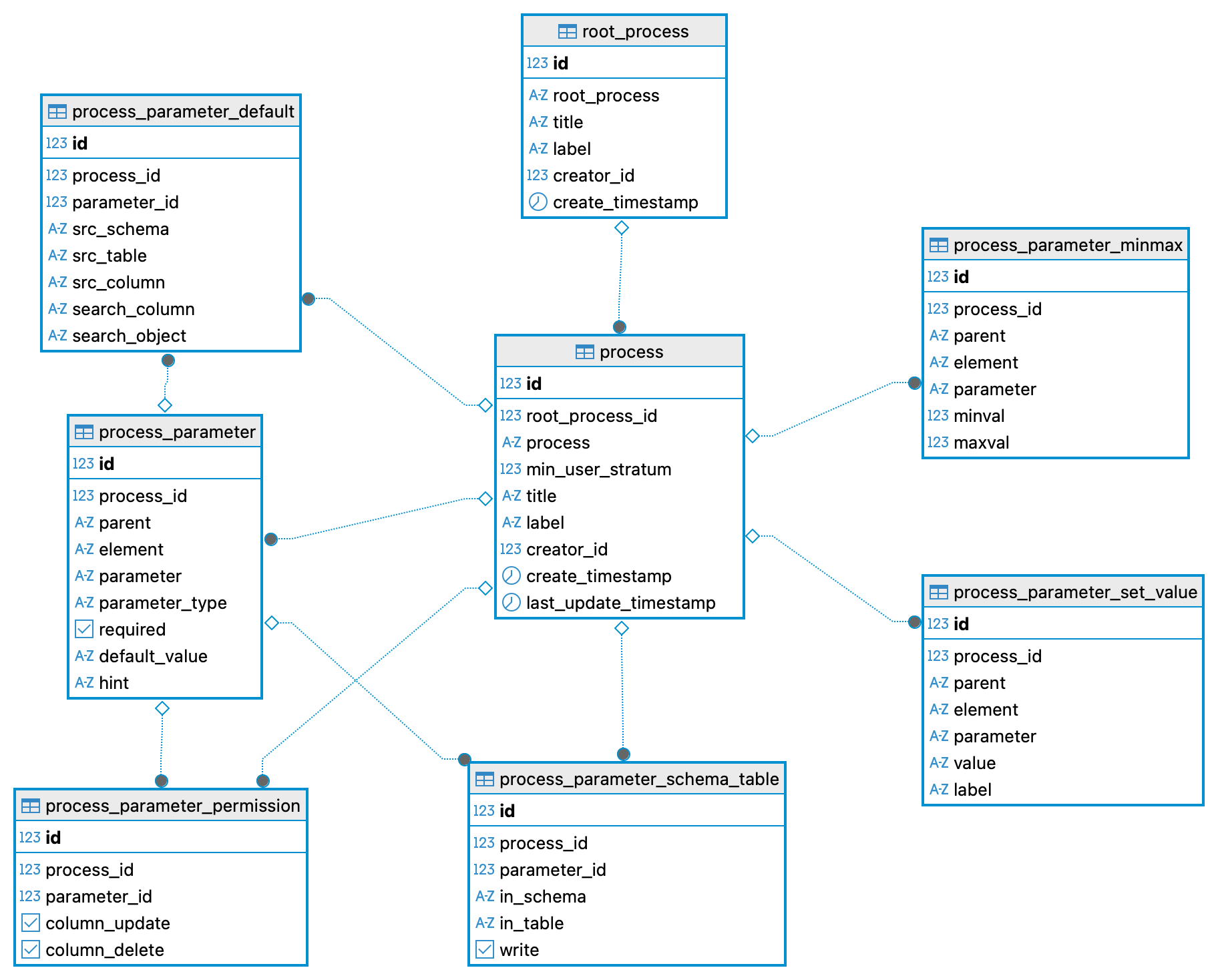
The process_file processes_v10_sql.json defines the table structure for definition of processes that the framework should include. It defines the following tables:
- root_process (for agglomerating a family of sub_processes),
- process (actual processes that the framework can run),
- process_parameter (definition of all parameters required by a specific process),
- process_parameter_set_value (if a text parameter can take on only a predefined set of values),
- process_parameter_minmax (if a numerical parameter is restricted to a range)
- process_parameter_schema_table (the target table for any particular parameter),
- process_parameter_permission (if a set parameter is allowed to be updated or deleted), and
- process_parameter_default (default parameter values if no value is given by user).
The figure below illustrates the content and connections for the schema process after setting up the Xspatula framework.
Initial process records
Running processes_records_v10_sql.json inserts the root process and processes required for managing all other processes in the framework.
Project file hierarchy
The directory structure for the project defined in the scheme_file and the job_file above looks like this:
.
├── scheme_setup.json # scheme_file
└── xspatula # project root directory (can be put anywhere - path given in scheme_file)
    ├── job_setup_db.json # job file (should be in a directory under the project root - path given in scheme_file)
    ├── setup_db # Should be a directory under the project root - path given in object job_folder in the job_file
        ├── db_xspatula_setup.txt # pilote_file - name given as object pilot_file in the job_file
        └── jsonsql # directory with process_files - path given as object process_sub_folder in job_file
            ├── schema_v10_sql.json # process_file listed in pilot_file
            ├── community_organisation_v10_sql.json
            ├── community_organisation_records_v10_sql.json
            ├── community_user_v10_sql.json
            ├── community_user_records_v10_sql.json
            ├── processes_v10_sql.json
            ├── processes_records_v10_sql.json
            ...